¶ Meshtastic Settings
¶ The Meshtastic Mesh is now on Medium Fast / Channel Slot 45
As of May 2025, the Brisbane, Gold Coast, Ipswich and Sunshine Coast mesh migrated away from the default "Long Fast' preset.
¶ Here are our preferred Meshtastic settings & Guidelines
Let's work together for a strong mesh.
Long Name use something respectful, and put a “(MQTT bridge)” at the end if you have the MQTT module enabled with the default settings - see below
Position Please don't make your “GPS Error” too large, so we can have a reasonable idea of your fixed node's location.
We are all for privacy, so pick a sensible location, reasonably close to your fixed location, with a very small diameter.
In suburbia there are many homes within a 100m. Don't use km's.
Device Role REPEATER and ROUTER should be only used when absolutely necessary, see the documentation for details.
For the majority of use cases, just use CLIENT or CLIENT_MUTE.
If you have a node on your roof, it should probably be CLIENT or ROUTER_LATE and the nodes in your house/building should all be CLIENT_MUTE.
Good resources explaining roles in more detail are here:
- https://meshtastic.org/blog/choosing-the-right-device-role/ (Doesn't mention ROUTER_LATE as it was written before this role existed)
- https://meshtastic.org/docs/configuration/radio/device/ (Covers all roles, but doesn't explain scenarios as well as the above blog post)
Remember - using the wrong roles can break the mesh for other users… so don't do what donny don't does. Start at CLIENT_MUTE and negotiate up from there as necessary to minimise the risk of negative impacts for others.
Hop Limit we tend to encourage slightly higher than the default 3, while the mesh is still building out. The actual number should be tested for your situation, but just using 7 is probably not correct.
Once your node has been online for a few hours and you have a good node list… have a look at the “Hop count”. If you're towards the middle of the city, you might see most people to the far north and south as 3 or 4 hops away. If that's the case, then 4 or 5 is probably the right choice.
If you're way up north, and the folks down south are all showing as 5 hops away, then consider 5 or 6.
7 is way out. (Unless you are 7 hops away from people, I guess).
¶ FAQ
To learn more about the change to Medium Fast, please check out the FAQ.
¶ Android App
To change to Medium Fast in the Android app…
- Open the menu (3 dots at the top-right of the screen)
- Go to Radio Configuration
- Go to LoRa Configuration
- Change Modem Preset to MEDIUM_FAST
- Change Frequency Slot to 45
- (Recommended) Change your hop limit: City/Central: 5, Coasts/Ipswich/NSW: 7
- Scroll to the bottom of the screen and hit Send
- Your node will reboot, and you are now on Medium Fast!
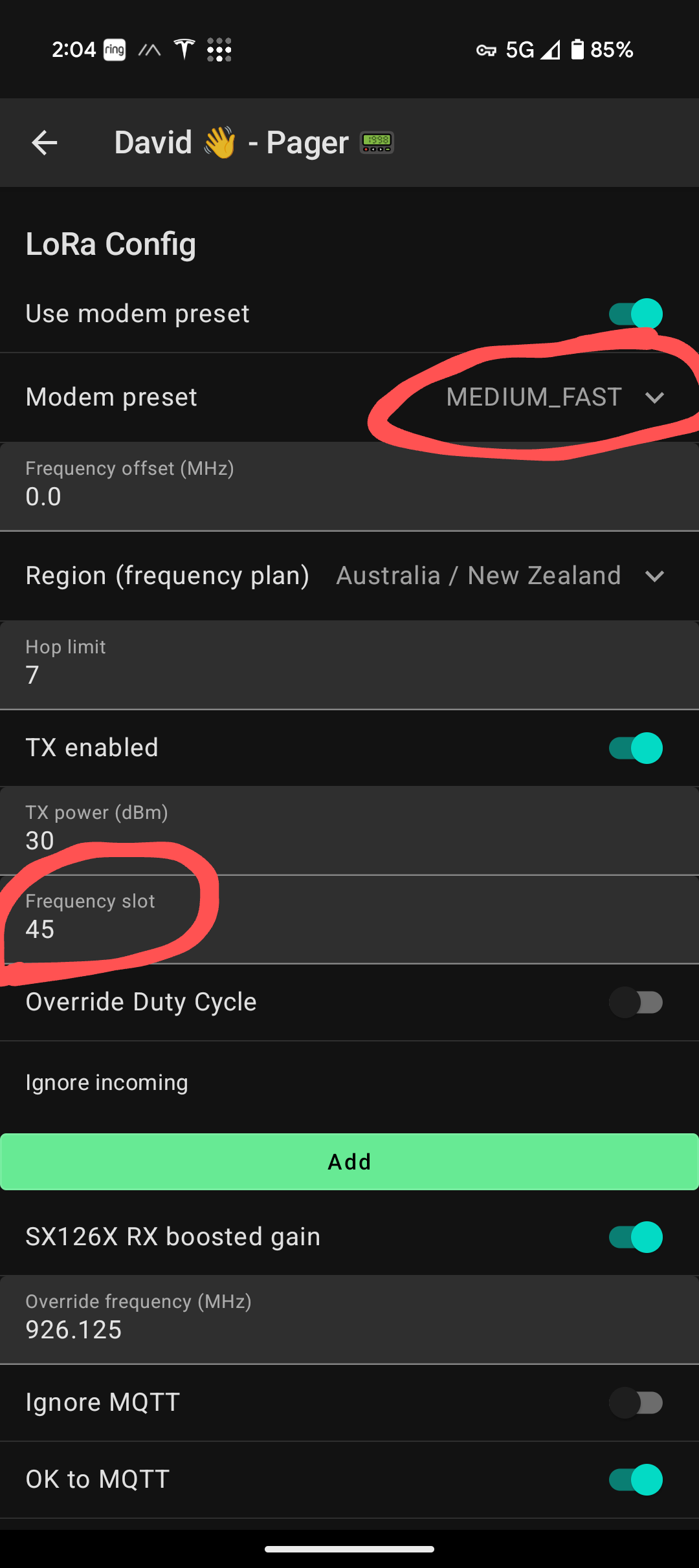
Checking your channel default channel…
After you change, channel 0 ("Long Fast") should now have renamed to “Medium Fast”.
If it hasn't you may need to edit your channels, and clear the “Channel Name” field and click “Send”.
By default this should change by itself, but if you've explicitly set it to “LongFast” previously, then you may need to make this change.
¶ iPhone App
To change to Medium Fast in the iPhone app…
- Tap “Settings” at the bottom right
- Under the “Radio Configuration” heading, tap “LoRa”
- Change “Presets” to “Medium Range - Fast”
- Change “Frequency Slot” to “45”
- (Recommended) Change your hop limit: City/Central: 5, Coasts/Ipswich/NSW: 7
- Your node will reboot, and you are now on Medium Fast!
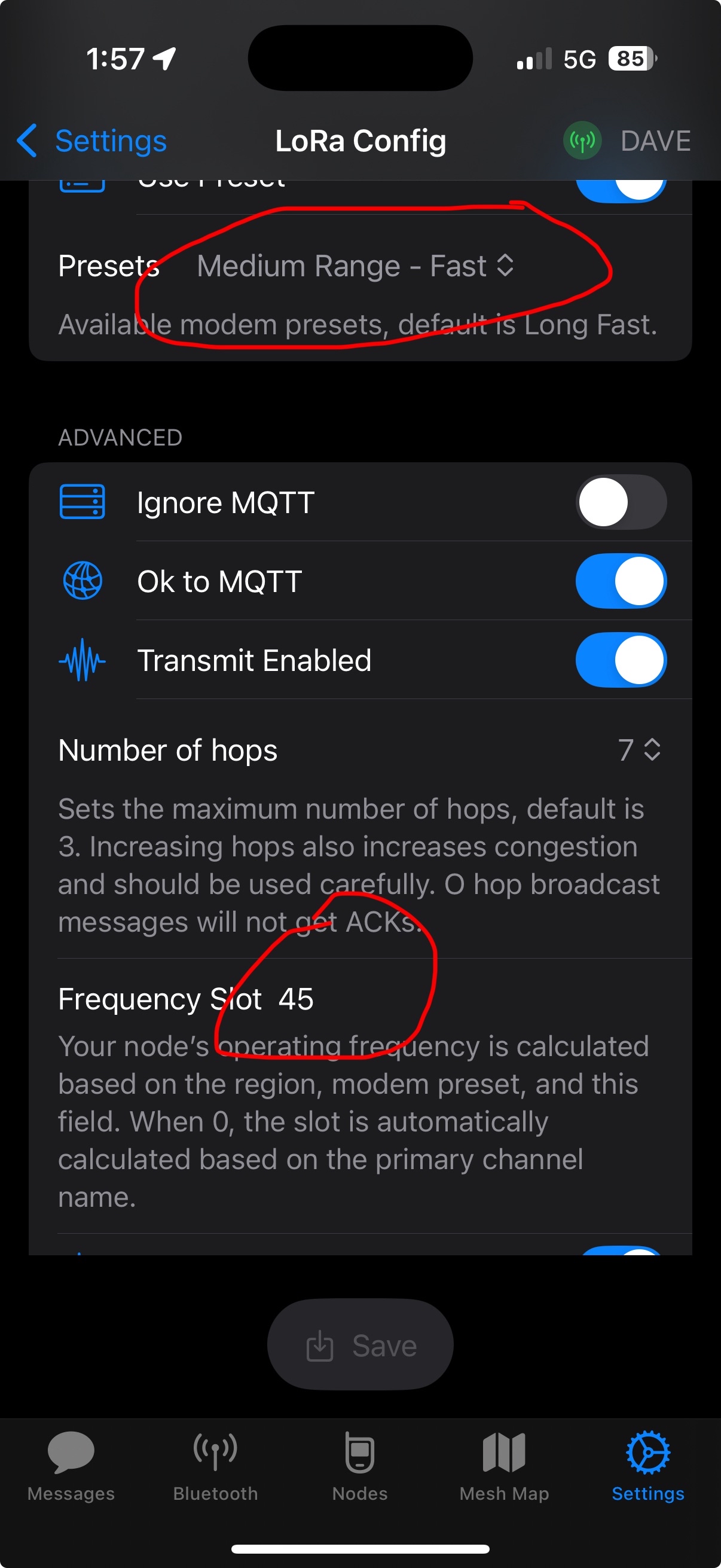
Checking your channel default channel…
After you change, channel 0 ("Long Fast") should now have renamed to “Medium Fast”.
If it hasn't you may need to edit your channels, and clear the “Channel Name” field and click “Send”.
By default this should change by itself, but if you've explicitly set it to “LongFast” previously, then you may need to make this change.
¶ T-Deck (or other Meshtastic UI Devices)
To change to Medium Fast on a T-Deck…
- Tap the “Cog” (settings) icon at the bottom left of the screen
- Tap “Modem preset: Long Fast”
- Change the dropdown to “Medium Fast”
- Slide the frequency slot over to "45 (926.125 Mhz)
- Tap OK
- Your device will reboot
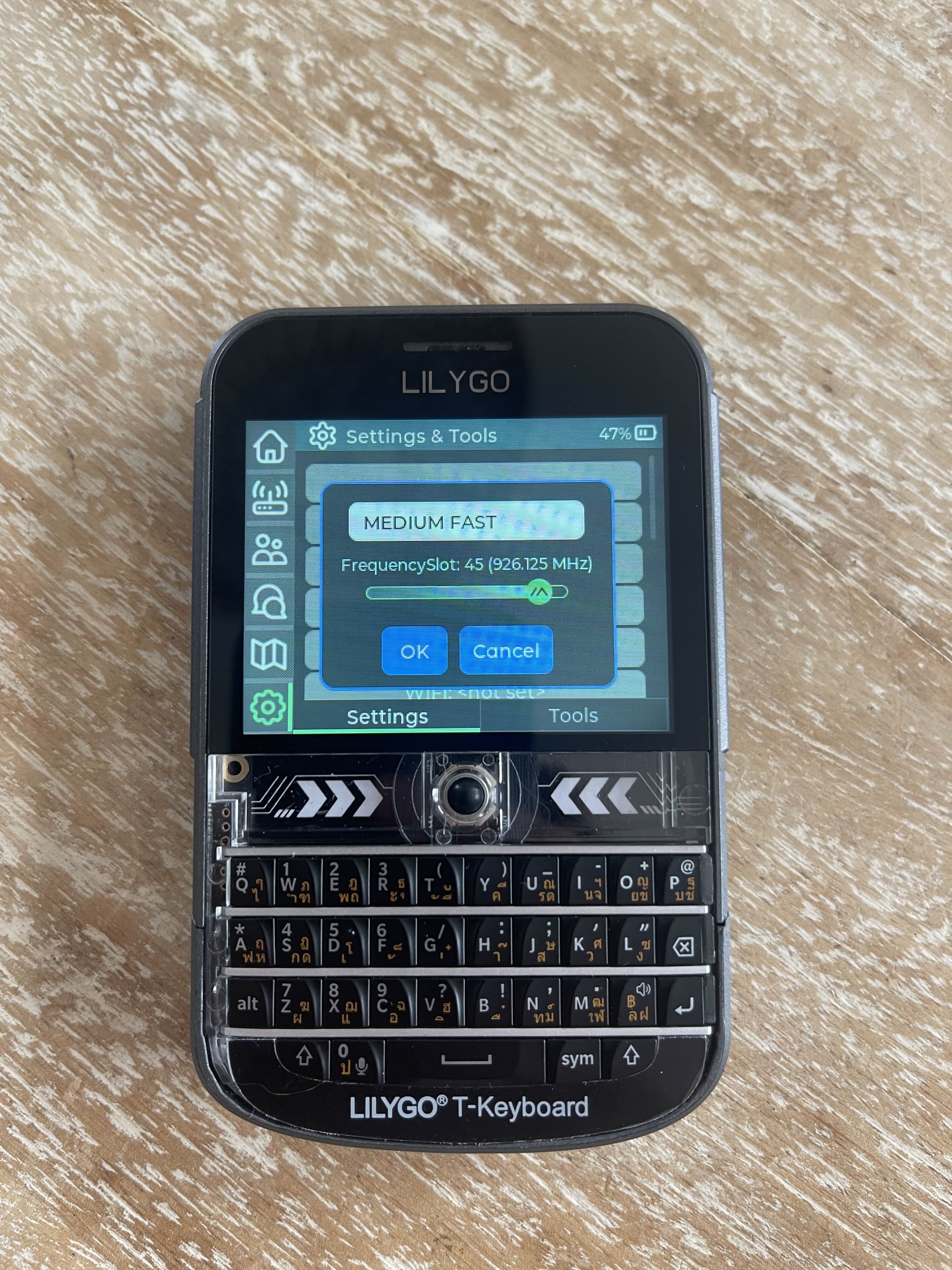
¶ Web UI
To configure from the web UI…
- Open the Web UI and connect to your. node
- Click Config on the main navigation menu
- Click LoRa on the tab bar across the top
- Change Frequency Slot to 45
- (Recommended) Change your hop limit: City/Central: 5, Coasts/Ipswich/NSW: 7
- Change Modem Preset to Medium Fast
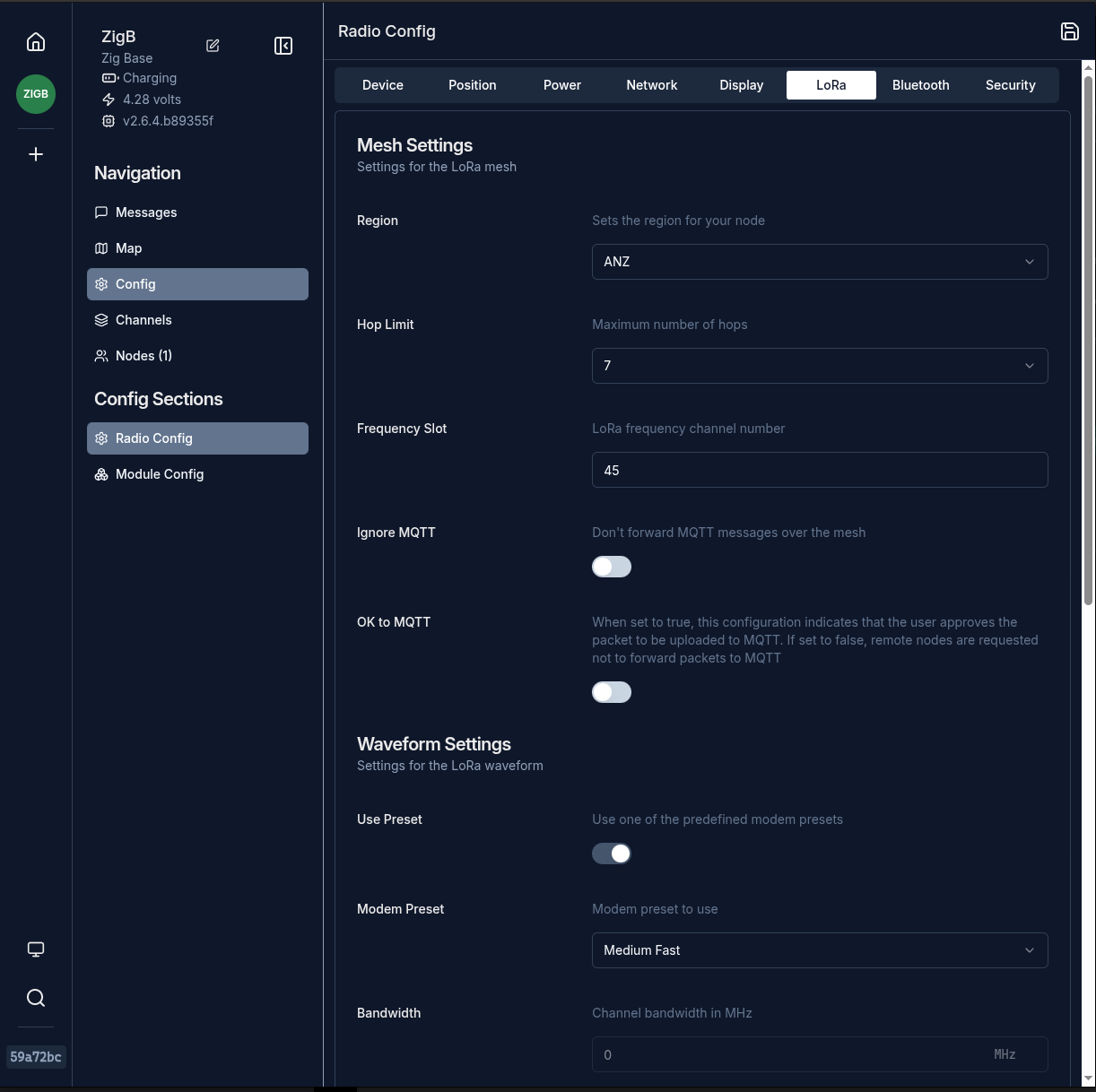
¶ Command Line
To change over from the CLI, run the following command…
meshtastic --set lora.modem_preset MEDIUM_FAST --set lora.channel_num 45